Most vending problems come down to five choices: machine type, placement, product mix, payment setup, and how the machine works and who handles service. If you get those right, you cut stockouts, fit buying habits, and avoid extra work for your staff.
Here’s the short version:
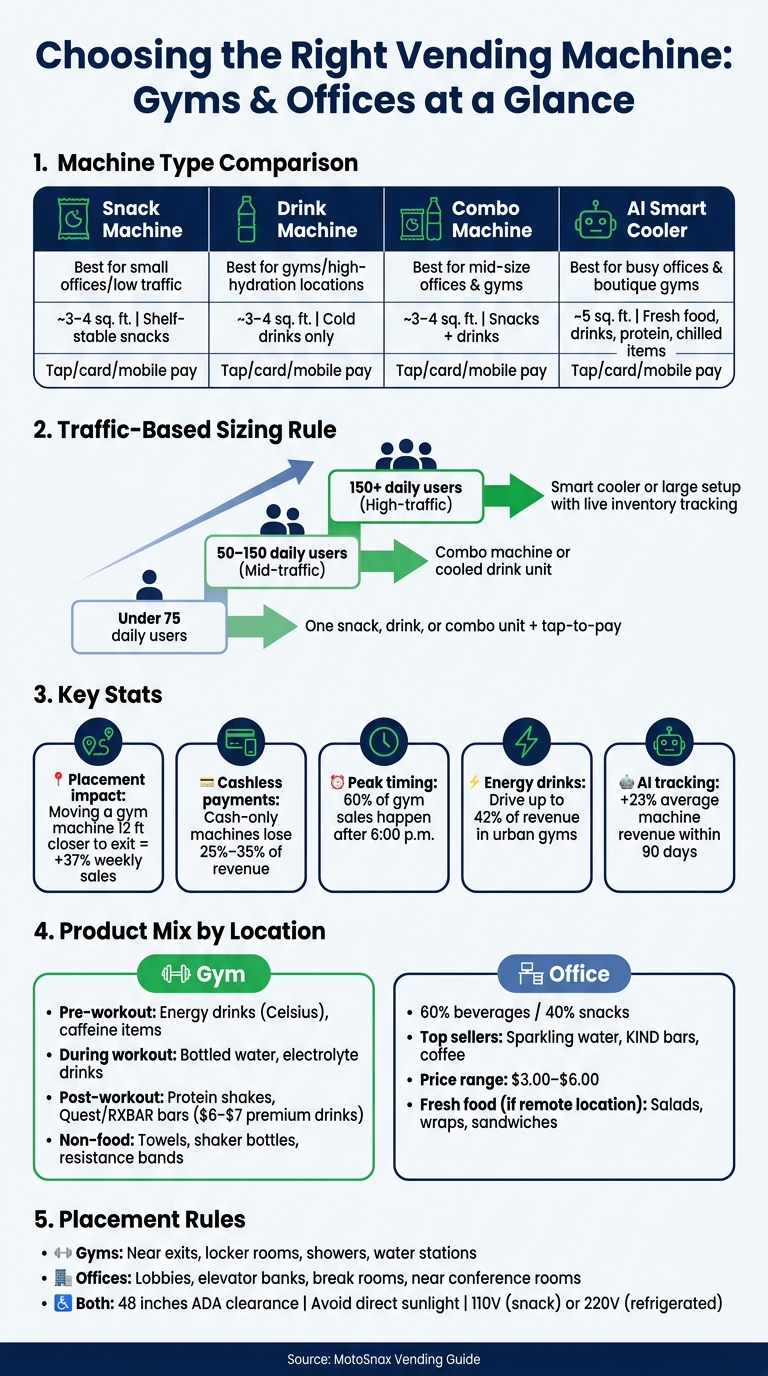
- Offices usually need snacks, drinks, coffee, and sometimes grab-and-go meals.
- Gyms usually sell more water, energy drinks, protein items, and recovery products.
- Smaller sites often do fine with one snack-and-drink unit.
- Busier sites may need a cooler or AI-based setup to keep up with peak demand.
- Placement matters a lot. A gym machine moved 12 feet closer to the exit saw 37% more weekly sales.
- Cashless payments matter. Cash-only units can lose 25% to 35% of sales.
- Peak timing matters too. One gym operator said 60% of sales happened after 6:00 p.m.
- Item mix should follow demand. In urban gyms, energy drinks can drive up to 42% of revenue.
- Tracking tools help. AI-based inventory systems have been linked to a 23% lift in average machine revenue within 90 days.
- Power and access still matter. Many snack units use 110V, while some cooled or frozen units may need 220V and clear ADA access.
If I were choosing a setup fast, I’d use this rule:
- Under 75 daily users: one snack, drink, or combo unit with tap-to-pay
- Mid-traffic sites: combo machine or cooled drink unit
- High-traffic offices or gyms: smart cooler or larger setup with live inventory tracking
- Office locations: start around 60% drinks / 40% snacks
- Gym locations: focus on pre-workout, hydration, and post-workout recovery
Vending Machine Types for Gyms & Offices: Quick Comparison Guide
Quick Comparison
| Setup | Best For | Main Use | Space Need | Item Range | Payment Must-Have |
|---|---|---|---|---|---|
| Snack machine | Small offices, low traffic areas | Shelf-stable snacks | About 3 to 4 sq. ft. | Narrower mix | Tap/card/mobile pay |
| Drink machine | Gyms, high-hydration locations | Cold drinks | About 3 to 4 sq. ft. | Drinks only | Tap/card/mobile pay |
| Combo machine | Mid-size offices and gyms | Snacks + drinks | About 3 to 4 sq. ft. | Mixed products | Tap/card/mobile pay |
| Smart cooler | Busy offices, boutique gyms | Drinks, meals, protein, chilled items | About 5 sq. ft. | Broad chilled mix | Tap/card/mobile pay |
Bottom line: I’d pick the machine based on peak traffic, place it where people already stop, stock the top sellers first, and use cashless payment plus live inventory tracking to keep the setup simple and useful.
sbb-itb-aa27f9f
Choose the right vending setup for your location
Machine types and where each works best
Start with buying patterns, then match the machine to your traffic, space, and product demand [8].
Different places need different setups. Offices usually do best with a mix of snacks and drinks. Gyms lean harder toward hydration and recovery items. A traditional snack machine makes sense in lower-cost spots with mixed traffic and mostly shelf-stable products. A refrigerated beverage machine is a stronger fit for high-exertion spaces like CrossFit gyms and cardio-heavy gyms, where cold drinks tend to move fast [2].
A combo machine gives you snacks and drinks in one unit, which makes it a smart pick for mid-size gyms and standard office breakrooms [8]. If you run a high-traffic tech or finance office, or a boutique gym where speed matters, an AI-powered smart cooler can be a better match [8]. These coolers work well for fresh food and premium recovery drinks because they keep products between 32°F and 50°F [3][5].
How to size the machine for your traffic and space
Traffic tells you a lot, but peak demand tells you more. Use daily traffic and your busiest windows to size the machine [3].
Space matters too. Most standard machines need about 3 to 4 square feet of floor space, plus enough room for the door to open [1]. If you’re tight on room, compact units can fit in a footprint as small as 22.8" x 30", which works well in hallway alcoves [3]. On the other end, large offices can support dual-door units that hold about 828 products [3].
Timing also changes the math. Offices often get a rush during morning arrival and lunch. Gyms usually get busier in the evening [2][3]. If you size for the average hour, you can still end up empty when demand hits. Sizing for the peak window helps avoid that out-of-stock problem, which can hurt repeat use [3].
Comparison table: traditional machines vs. combo machines vs. smart coolers
| Feature | Traditional Machine | Combo Machine | AI Smart Cooler |
|---|---|---|---|
| Ideal Daily Traffic | Low to medium (<50 daily users) | Medium (50–150 daily users) | High (150+ daily users) |
| Space Needed | 3–4 sq. ft. | 3–4 sq. ft. | ~5 sq. ft. |
| Product Flexibility | Fixed (coils/trays) | Snacks + drinks | Fresh food, drinks, snacks |
| Fresh Item Support | No | Limited (if refrigerated) | Excellent (32°F–50°F) |
| Restock Time | 30+ minutes | 20–30 minutes | Very fast |
| Monitoring | Manual or basic | Remote telemetry | Real-time AI inventory |
| Revenue Potential | Baseline | Moderate | 2–3x traditional [8] |
| Best Environments | Small offices | Mid-size gyms, breakrooms | Tech offices, boutique gyms |
One thing is clear: cashless payment isn’t optional. Cash-only machines can leave 25% to 35% of revenue on the table [8]. Built-in 4G/LTE also helps keep payments live if Wi‑Fi drops, and it can sidestep IT approval delays [3].
Once the machine is chosen, placement and product mix determine usage.
Place machines correctly and stock the right products
Placement strategies for offices and gyms
Machine placement matters just as much as the products inside.
In offices, put machines where people already pass by or pause for a minute: lobbies, entrances, elevator banks, break rooms, and near conference rooms [5][11].
In gyms, the best spot is usually along the exit path. Put machines near exits, locker rooms, showers, and water stations to pick up post-workout purchases [2][4]. One case study found that moving a gym machine just 12 feet closer to the exit led to a 37% increase in weekly sales [2].
A few rules apply in both places:
- Leave 48 inches of clearance for wheelchair access [11]
- Most snack machines use 110V power; refrigerated or frozen machines may need 220V [11]
- Keep machines out of direct sunlight, since sun can increase cooling costs and hurt product quality [11][3]
And don’t tuck a machine away in a basement or side hallway. If people don’t see it, they won’t use it.
Once the location is set, the next call is what to stock.
What to stock in gym vending machines
Gym machines should cover pre-workout, during-workout, and post-workout demand [2].
Before a workout, people usually want caffeine and energy. Energy drinks like Celsius fit that need well. During a session, bottled water and electrolyte drinks are the main items. After the workout, protein shakes and recovery snacks tend to lead, with protein bars like Quest or RXBAR and premium recovery drinks priced at $6.00–$7.00 [9].
Energy drinks alone can make up up to 42% of total revenue in urban gym settings [2], so it makes sense to keep them in stock. Gyms also do well with non-food items like sweat towels, shaker bottles, sanitizing wipes, and resistance bands [4][2].
Skip sugary sodas and candy. They clash with the gym’s brand and can even get the machine removed altogether [9].
That mix works even better when inventory is tracked automatically.
What to stock in office vending machines
Office vending tends to work best with a 60% beverage and 40% snack mix [3]. Most items should fall in the $3.00–$6.00 range. In many office settings, sparkling water, KIND bars, and coffee are steady sellers [5].
If the office is far from dining options, refrigerated fresh food can do well too. Salads, wraps, and sandwiches often increase the average transaction value [3].
Use the table below to match products, placement, and pricing.
| Category | Gym Examples | Office Examples | Best Placement | Price Range |
|---|---|---|---|---|
| Energy Drinks | Celsius [9] | Celsius, Red Bull [5] | Gym entrance or exit path; office lobby and elevator banks [5][11] | $3.75–$4.50 [9] |
| Protein / Recovery | Quest bars, RXBAR, protein shakes [9] | KIND bars, protein bars [3][11] | Exit path and locker rooms in gyms; break rooms in offices [2][5] | About $4.50 for bars; $6.00–$7.00 for premium recovery drinks [9] |
| Hydration | Electrolyte drinks, bottled water [2][9] | Sparkling water, bottled water [3][5] | Near water stations in gyms; lobby, break room, or elevator banks in offices [4][5][11] | $2.00–$4.00 [5][9] |
| Fresh Food | Yogurt, hard-boiled eggs [3] | Salads, wraps, sandwiches [3] | Refrigerated unit near the exit or lobby [3] | Varies |
| Coffee | – | Coffee [5] | Lobby, elevator banks, or break rooms [5][11] | $3.00–$6.00 [5] |
A simple way to manage inventory is to stock 80% proven sellers and 20% seasonal or test items [6]. Run that mix for 30 days, then keep only the top 10–15 SKUs [7].
The next step is reducing restock trips with better monitoring and cashless payment tools.
Cut management workload with AI tools, cashless payments, and managed service
AI-powered inventory tracking, forecasting, and remote monitoring
These tools cut site visits and help prevent empty slots. Cloud-based platforms update inventory after each transaction, while IoT connectivity tracks temperature and machine status in real time. Stock alerts show what needs refilling before anyone makes the drive to the site [11][1]. The result is lower labor, less waste, and a machine that stays ready when demand spikes.
Predictive analytics adds another layer. It can forecast demand, spot slow sellers, and flag maintenance problems before they turn into urgent service calls [11]. Instead of relying on gut instinct, operators can restock based on live data. AI-powered inventory tracking has been shown to increase average revenue per machine by 23% within 90 days by improving the product mix [2]. And smart coolers can be restocked in minutes, not half an hour [3].
Once inventory is handled automatically, the next slowdown is usually payment.
Cashless and contactless payment options for US users
In gyms and offices, cash often just gets in the way. Most people want to tap, grab their item, and move on. That means modern machines should support chip cards, tap-to-pay debit and credit cards, Apple Pay, and Google Pay [11][10]. In office settings, machines can also accept employee badges for meal programs or payroll deduction [11].
For gyms, speed matters even more. Someone leaving a workout is much more likely to make a purchase if checkout takes only a moment.
"A gym vending machine without tap-to-pay or mobile wallet support creates friction when a member is ready to buy, and usually that friction leads to a lost sale." – Vending.com [4]
Advanced payment systems can process transactions in under three seconds [11].
How MotoSnax Vending handles operations for you
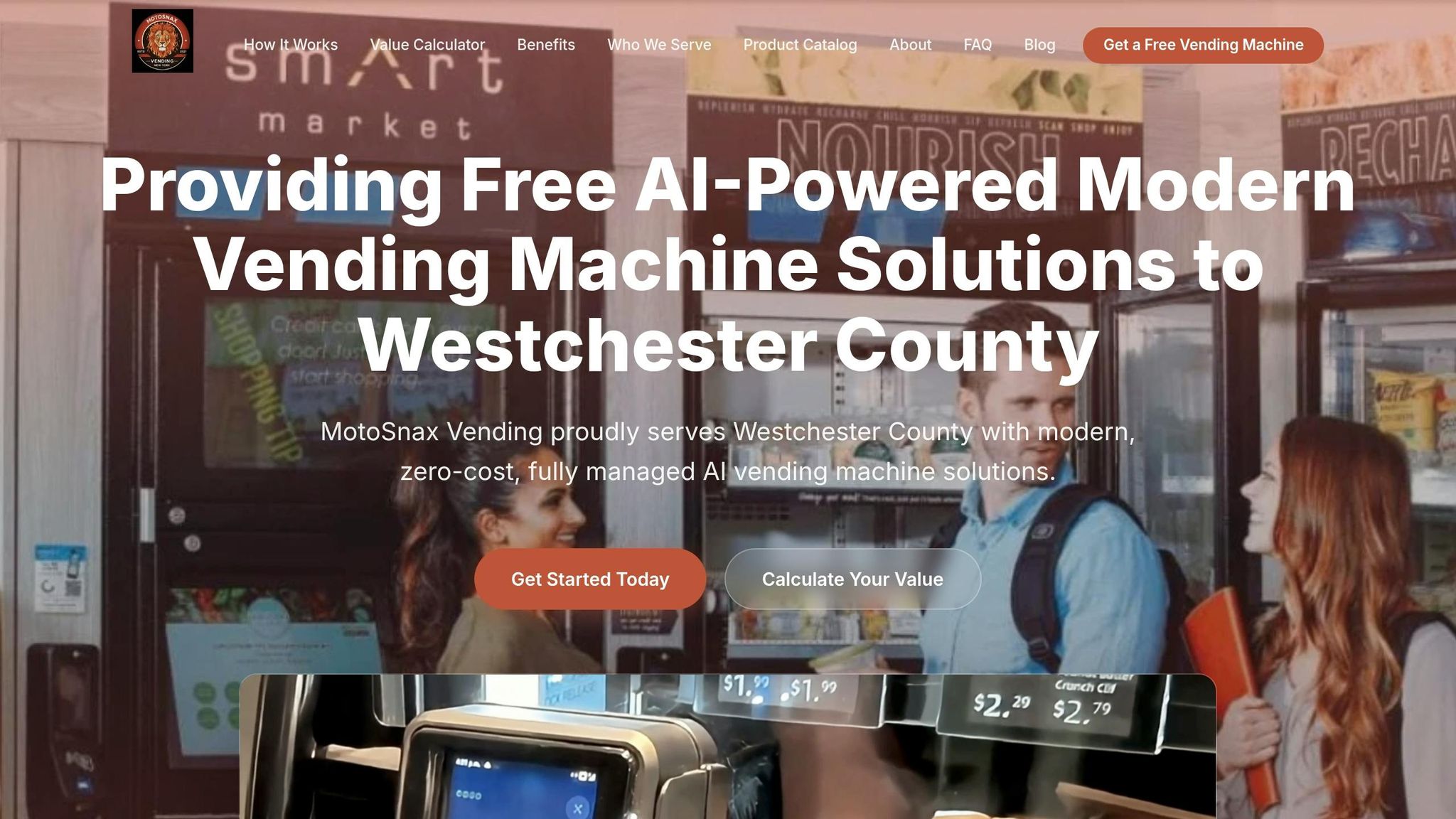
MotoSnax runs the program from end to end. For locations in New York and Connecticut, that includes installation, maintenance, restocking, and real-time inventory management. The facility pays $0 upfront. MotoSnax makes its money through product sales.
Product selection can be tailored to the location. A gym might stock protein drinks and healthier snacks, while an office may lean more toward coffee and grab-and-go items. That keeps the machine useful without adding work for your staff. The machines also use LED lighting and Energy Star refrigeration, which can use up to 75% less electricity than older models [11].
Next, define policies and KPIs so the program stays compliant and measurable.
Set policies, track performance, and pick the right plan
Compliance, accessibility, and internal standards
Once you’ve chosen the machine, placement, and product mix, set the ground rules that keep the program running well day after day.
Before launch, confirm that the machine fits the site’s safety, access, and utility needs. ADA compliance means leaving enough space for wheelchair access and making sure payment and selection controls sit within easy reach [13]. Use cellular connectivity for remote monitoring and payment uptime [3]. If you’re running a micro market, put it in a controlled-access area with visible camera coverage [1].
It also helps to name one site contact up front. That could be an office manager, facilities director, or gym GM. This person handles product issues and service requests, which cuts down on confusion and back-and-forth [9][5]. In the site agreement, spell out exclusive placement rights [12].
Comparison table: goals, KPIs, and next steps
These metrics help you decide whether to stay with the current setup, add more machines, or move to a different format.
| Goal | Machine Configuration | Product Strategy | Key KPIs |
|---|---|---|---|
| Convenience | Traditional Vending or Smart Cooler | High-volume snacks/drinks, 24/7 access | Sales volume, stockout frequency |
| Wellness | Smart Cooler or Micro Market | Protein bars, fresh salads, low-sugar drinks | Percentage of healthy SKU sales, satisfaction feedback |
| Revenue Growth | High-capacity AI units | Premium-priced energy drinks and recovery products | Gross monthly revenue, average transaction value |
| Waste Reduction | AI-monitored units | Data-backed stocking; pruning slow movers | Inventory turnover rate, spoilage/expired product rate |
Machine uptime should stay at 99% or higher if you want dependable service [13]. Average transaction value matters too. Gym locations usually fall between $5 and $8 per visit, while office machines tend to average $3 to $6 [5][9]. Watch product sales velocity closely so you can spot top sellers, catch weak items early, and avoid product fatigue [13].
Conclusion: How to pick the right vending solution for your gym or office
Start with traffic and space. Then build from there.
If a location has fewer than 75 daily users, it usually doesn’t need an AI cooler. A standard or combo machine with cashless payments will do the job [8][3]. Busier sites with more foot traffic often get more from smart coolers or micro markets, since those setups handle volume better and can cut restocking trips.
Placement matters more than many people think. Put machines where people naturally pause, like near exits, elevators, or lobbies, instead of tucking them into dead corners [12]. Then stock products that fit the space and match what people want to buy. Review sales data often, update the mix based on actual demand, and plan inventory changes 30 days ahead of seasonal shifts [7]. Pick the format that fits the traffic, then use the sales numbers to make the next move.
FAQs
How do I choose the right machine size for my location?
Choose the machine size based on daily traffic and the floor space you have. Smaller locations with fewer than 75 users per day usually do fine with compact units. Larger sites with 150+ employees or busy gyms often need high-capacity dual-door units or AI-powered smart coolers.
Before you decide, measure the space for door swing, power access, and clearance so the machine fits the area and doesn’t get in the way of day-to-day use.
What products should I stock first in a gym or office machine?
In offices, start with a 60:40 beverage-to-snack mix. Put more weight on drinks, especially energy drinks, sparkling water, and protein shakes. Then round things out with snacks like protein bars, trail mix, and premium chips.
For gyms, stock by where someone is in their workout. Before a session, offer pre-workout energy drinks and caffeine shots. During the workout, focus on electrolyte drinks and water. Afterward, stock protein shakes, bars, and recovery snacks.
One clear rule for gym setups: skip candy and traditional soda.
When is it worth upgrading to a smart cooler or AI-based setup?
It’s worth upgrading when your location gets heavy foot traffic – usually more than 150 to 200 visitors a day – and you want to increase transaction value. In many cases, these setups can bring in two to three times the revenue of standard vending machines.
They’re also a good fit if you want to sell a broader refrigerated product mix or need real-time inventory tracking, user behavior insights, or a low-labor swap for staffed counters.