You can add vending at $0 upfront if your site has enough traffic and the vendor runs the whole setup. In most cases, you provide space, power, and access. The vendor provides the machine, installation, stocking, card payments, remote tracking, and repairs.
Here’s the short version:
- Buying a machine often costs $4,000 to $8,000 per unit
- A fully managed plan shifts machine cost and service work to the vendor
- Your main site cost is usually electricity, about $10 to $25 per machine each month
- Many vendors look for about 40 daily users for standard vending
- Micro-markets often need 125+ regular employees and 150 to 300 sq. ft.
- Cashless payment can lift sales by 15% to 30%
- Service calls are often covered, with repair windows around 24 to 48 hours
If I strip it down even more, this model works like this:
- The vendor checks your site
- The vendor installs the machine
- The vendor restocks based on sales data
- The vendor fixes issues when alerts come in
- You keep the area powered, open, and easy to reach
That’s the main tradeoff: you don’t buy or run the machines, but you also need a location that can support steady sales.
A few details matter before saying yes:
- Put the machine in a visible, high-traffic spot
- Confirm 110–120V power
- Check Wi-Fi or cellular signal
- Ask for the repair window, refill schedule, and product rules in writing
- Decide upfront what the vendor should always stock and never stock
Here’s a quick side-by-side look:
| Option | Upfront cost | Who owns machine | Who stocks it | Who pays repairs | Site’s main cost |
|---|---|---|---|---|---|
| Buy | $4,000–$8,000 | You | You or your staff/vendor | You | Power, repairs, stock |
| Lease | Monthly payments | Usually leasing company/vendor | Often still your job to coordinate | Varies by agreement | Lease, power, service |
| Fully managed $0 plan | $0 | Vendor | Vendor | Vendor | $10–$25/month electricity |
So if you want the plain answer: no upfront cost vending is a revenue-based service model, not free equipment with no strings attached. It fits best when your building has the people, space, and access needed to keep sales moving.
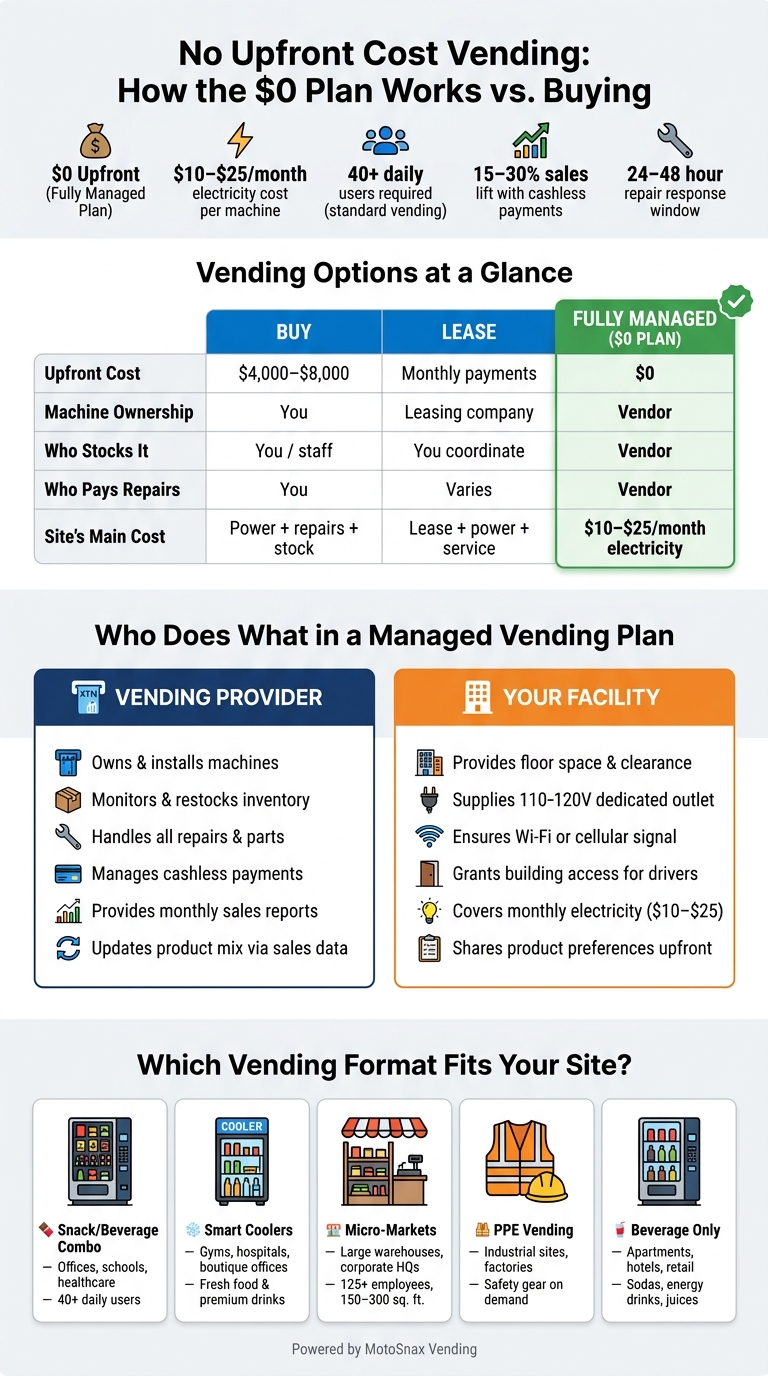
No Upfront Cost Vending vs. Buying: Full Cost & Responsibility Breakdown
How a Fully Managed Vending Service Works, Step by Step
Site Review, Machine Selection, and Installation
It starts with a walkthrough of your site. The provider checks the basics: foot traffic, employee count, power access, and Wi-Fi or cellular signal strength. That last part matters more than people think, because remote monitoring only works when the machine has a steady Wi-Fi or cellular connection [1][6].
After that, the provider suggests the right setup for the space. For example, a micro-market usually needs 150 to 300 square feet and tends to work better at larger locations with 125 to 150 or more regular employees [6]. Once you agree on the format, setup usually moves pretty fast. The physical install – positioning the machine, leveling it, connecting power, and testing the payment system – often takes under two hours. Most locations are up and running within a week of the first inspection [1][7].
Placement makes a big difference. Breakrooms, lobbies, and spots near elevator banks usually perform well. Tucked-away hallways usually don’t [8][6].
Stocking, Remote Monitoring, and Maintenance
Once the machine is live, the provider takes over the daily work. Modern machines use remote inventory tracking to watch stock levels and machine health in real time. That lets the provider restock when inventory runs low instead of making unnecessary trips [1][8]. In plain English: fewer wasted service visits and fewer empty slots.
Cashless payment is part of the setup from day one. Machines can accept contactless cards, Apple Pay, Google Pay, and mobile wallets. Adding cashless and tap-to-pay options often increases vending revenue by 15% to 30% compared with cash-only machines [8].
If something goes wrong, the system can send an automatic error alert. It can flag jams, validator errors, and low stock before sales start slipping [1][8]. Repairs are covered at no cost to the facility, and most managed agreements aim for a 24- to 48-hour response window [1][8].
Reporting and Service Follow-Through
Facilities usually get monthly digital sales reports, broken out by machine and by SKU. Each report shows item-level sales and inventory trends, so you can see what’s moving and what’s just taking up space – without tracking it by hand [8][6].
A simple move during onboarding can save a lot of back-and-forth later: set a must-carry list and a never-stock list. That gives the provider a clear starting point for product changes based on sales data [8].
The SLA should also be clear about refill cadence and repair response times. That’s the document that spells out exactly what the provider is on the hook for when it comes to refills and repairs.
sbb-itb-aa27f9f
Vendor Responsibilities vs. Facility Responsibilities
Once installation is done, the division is pretty straightforward: the provider runs the machines and manages the inventory, while the facility supplies the space, power, and access. That setup keeps the day-to-day work light for the facility and easy to run for the provider.
What the Vending Provider Owns and Manages
The provider keeps full ownership of the machines. It also takes care of delivery, installation, cashless payment setup, remote monitoring, stocking, and repairs. If a card reader stops working or a refrigeration unit goes down, the provider covers both parts and labor [1][8][9].
The provider also controls the product mix. It sets the first layout based on your audience, then uses sales data to swap out slower-selling items over time [1][8][9].
What the Facility Still Needs to Provide
The facility’s role is limited, but it still matters. In most cases, you’ll need:
- A dedicated 110–120V outlet for each machine
- Enough floor space and clearance
- Steady Wi-Fi or cellular service for remote monitoring and cashless payments [1][8][6]
Electricity is usually the facility’s main recurring cost. That cost often lands around $10 to $25 per month for each machine [4][10]. If the site needs electrical work before installation, the facility usually handles that instead of the vendor [8][4].
The facility also needs to set access times so service drivers can restock and service the machine without getting in the way of daily operations. And if your site has product rules – like health, wellness, or PPE needs – it helps to share those up front so the vendor can shape the product mix from day one [8].
| Responsibility | Vending Provider | Facility |
|---|---|---|
| Equipment | Owns, delivers, and installs machines | Provides floor space and clearance |
| Stocking | Monitors levels and refills products | Provides building access for drivers |
| Maintenance | Handles repairs, parts, and technical support | Reports malfunctions and site issues |
| Payments | Manages card readers and mobile wallets | None |
| Product Mix | Updates assortment based on sales data | Provides health, wellness, or PPE guidance |
| Utilities | Manages remote monitoring and cashless connectivity | Supplies a dedicated 110–120V outlet and covers electricity |
| Financials | Collects revenue and pays sales tax | Covers monthly electricity costs |
With responsibilities spelled out, the next step is looking at where this setup works best and what it looks like in daily use.
Where No Upfront Cost Vending Fits and What It Delivers
Use Cases: Snack, Beverage, PPE, Smart Coolers, and Micro-Markets
With roles sorted out, the next step is simple: does your site have the traffic and space to make a $0 plan work?
No upfront cost vending tends to work best when the machine format matches the site. A standard machine can do well in places with steady foot traffic. A micro-market is a bigger setup, so it usually needs more people and more room. In plain terms, headcount, space, and daily traffic decide what makes sense.
Most vendors want at least 40 regular daily occupants before placing standard vending machines. Micro-markets usually need 125 or more people plus a set area to perform well [5][12]. That gap matters. A small office may do fine with a snack-and-drink combo unit, while a large warehouse or corporate campus may get more from a micro-market.
| Machine Format | Product Types | Inventory Control | Best-Fit Environments |
|---|---|---|---|
| Snack/Beverage Combo | Chips, candy, canned/bottled drinks, bars | Cloud-monitored | Offices, schools, manufacturing plants, healthcare facilities |
| Smart Coolers | Fresh food, protein shakes, premium beverages | Real-time AI monitoring | Gyms, hospitals, high-end apartment lobbies, boutique offices |
| Micro-Markets | 100+ SKUs, fresh food, premium snacks | Open-shelf, self-checkout kiosks | Large warehouses, corporate HQs, closed campuses |
| PPE Vending | Safety gear, gloves, safety glasses, vests, earplugs | Telemetry-controlled | Industrial sites, manufacturing floors, factories |
| Beverage Only | Sodas, energy drinks, juices | Cloud-monitored | Apartment complexes, retail spaces, hotels |
Multi-shift sites often produce steadier sales than single-shift offices [5][9]. That makes sense. If people are coming through all day and night, the machine has more chances to sell. Picking the right format also helps cut empty slots, avoids service runs that didn’t need to happen, and trims admin effort. So site fit isn’t just about convenience. It ties straight to day-to-day performance.
Day-to-Day Benefits for Managers and Owners
Once the format lines up with the site, the next win is simpler daily management.
For managers, the biggest upside is less time spent juggling vendors. Handling 3 to 5 separate break room vendors can eat up as much as 12 hours of staff time each month. At a $75,000 annual salary, that coordination load can cost a facility up to $6,750 per year [12]. That’s a lot of time and money spent just keeping snacks and drinks in place.
There’s also the employee side of it. Staff get 24/7 access to refreshments, which can cut down on off-site runs and help support morale and productivity [1][9][2]. In a busy workplace, even small time savings add up.
On the service side, the setup is much more hands-off. Repairs are usually handled before small issues turn into bigger ones. Restocking happens based on actual sales data instead of a fixed route. And inventory can be tracked remotely in real time [1][3][11]. That means fewer surprises and less chasing people down for answers.
| Feature | Facility-Owned Vending | Fully Managed ($0 Plan) |
|---|---|---|
| Upfront Investment | $3,000–$8,000 per machine [10] | $0 [1][5] |
| Admin Workload | High – ordering, stocking, managing cash | Minimal – one point of contact |
| Financial Risk | High – facility pays even if sales are low | Zero – provider earns only from product sales |
| Technology | Often older; upgrades cost extra | Modern cashless, AI-monitored, cloud-tracked |
How MotoSnax Vending Applies This Model and Key Takeaways
What Facilities Can Expect from MotoSnax Vending’s $0 Plan
Now that the roles are clear, here’s what this looks like on-site with MotoSnax Vending. For qualifying facilities, MotoSnax Vending’s $0 plan can mean $0 upfront. The company supplies, installs, stocks, monitors, and repairs the machines [1][13].
Facilities can also shape the starting product mix. That means you can ask for healthy snacks, vegan options, or specific beverages based on what your team wants to buy [1][2][13]. And restocking isn’t tied to some rigid route schedule. It follows telemetry data, so machines get attention based on actual sales and inventory levels [1][13].
The tradeoff is pretty simple: the facility provides space, power, and access, and MotoSnax handles the day-to-day service. In most cases, the facility only covers electricity, which is usually about $15–$25 per month per machine [4]. In exchange, the site needs to offer:
- An indoor, visible location
- About 30–40 inches of width
- A standard 110V outlet
- Reasonable access for the service team [4][14]
Final Summary for Facility Decision-Makers
Before you move ahead, check the repair response time and ask whether support is promised within a set window. Fast service is often same-day to 24 hours [1][15]. It also helps to confirm that your site meets the placement bar, since most $0 programs require 40 or more regular on-site employees [4][5].
If your location checks those boxes, the pitch is pretty direct: for facilities that qualify, the model means no upfront capital, no machine ownership, and no daily vending management [1][13].
FAQs
How do I know if my site qualifies?
Providers usually start with a short site check to see whether your location is a fit. They’ll look at your headcount, the space you have available, and the amount of foot traffic you expect. The main goal is simple: make sure there’s enough demand to support the equipment.
To confirm if you qualify, reach out to a service representative and set up a no-obligation site visit. They can look over your facility layout, talk through your day-to-day goals, and suggest the best equipment placement and service plan.
What happens if sales are too low?
If sales are too low, the location may be reviewed again. Since the provider makes money from product sales, they have a clear reason to tweak the product mix and service schedule to get better results.
If usage still falls short of the required level, the equipment may be removed. Before you sign, ask about any minimum sales thresholds and the provider’s exit policy.
Can we choose what the machine stocks?
Yes. With a fully managed service, the vendor works with you to shape the product mix around what your team wants. That can include healthier snacks, plant-based picks, and allergen-friendly items.
You can set those preferences during setup. From there, the vendor uses sales data to fine-tune inventory over time. They take care of stocking and freshness, while keeping the selection aligned with your workforce.