Smart cooler cameras track what you take or return, then use that basket to calculate your charge and update stock. My advice: before installation, confirm how incorrect charges are fixed – not just how accurately the cameras identify products.
MotoSnax Vending reports up to 99.9% item recognition accuracy. That still leaves room for mistakes. Here’s what I’d check:
- Checkout: How similar products are identified, returned items are removed, and payment holds differ from final charges.
- Restocking: How stock alerts guide visits, typically 1–3 times per week, and product choices for offices, gyms, and hospitals.
- Setup: About 6–8 square feet of space, plus power, connectivity, and service access.
- Privacy and support: Who can view recordings, how data is protected, and who handles refunds and outages.
For sites in Westchester, Rockland, and Fairfield counties, I’d also confirm MotoSnax’s eligibility and revenue-share terms. <u>Put responsibilities and response times in writing</u>, including same-day response for critical outages and 24–48 hours for noncritical issues.
How Smart Vending Works: Cameras to Checkout
How Cameras Identify Products and Build a Basket
Camera Images and Product Recognition
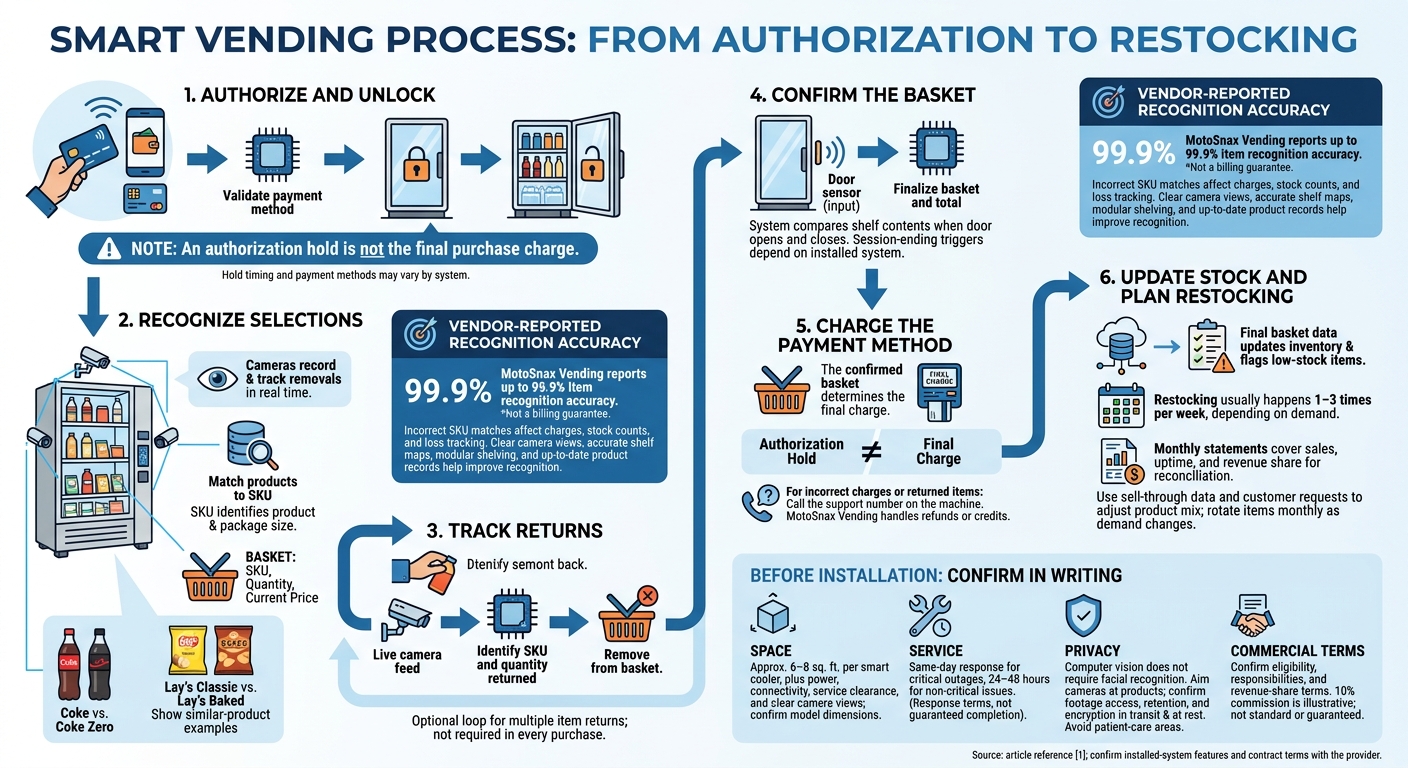
A SKU identifies a specific product and package size. Cameras record what’s on the shelf at the start and track removals in real time, matching each item to its SKU. The model needs to tell similar packages apart.
Examples include Coke versus Coke Zero or Lay’s Classic versus Lay’s Baked. [1]
Shelf maps, clear camera views, modular shelving, and up-to-date product records help improve accuracy. In offices, gyms, and hospitals, this allows the cooler to identify grab-and-go purchases without manual scanning. [1]
Tracking Items Taken and Returned
The system compares shelf contents when the door opens and closes to identify what shoppers took or returned. It builds a basket with each item’s SKU, quantity, and current price – even when someone takes several items at once. [1]
Here’s how vending machines work and how the transaction works:
| Stage | Camera or sensor input | System decision | Result |
|---|---|---|---|
| Authorization | Tap-to-pay, mobile wallet, chip, or swipe | Validate payment method | Unlock cooler |
| Selection | Live camera feed | Identify SKU and quantity taken | Add to basket |
| Return | Live camera feed | Identify SKU and quantity returned | Remove from basket |
| Completion | Door sensor | Finalize basket and total | Charge payment method |
The basket feeds payment authorization and the final charge.
Checking Recognition Errors
Recognition gets harder when several similar SKUs move together. Clear shelf views and accurate shelf maps help reduce errors. Operators should also update product records whenever the product mix or shelf layout changes. Misreads affect both customer totals and inventory counts. [1]
MotoSnax Vending reports up to 99.9% item recognition accuracy, but incorrect SKU matches can still skew charges, stock counts, and loss tracking. Accurate basket records help facility operators tell actual shortages apart from recognition mistakes or inventory-record errors. [1]
sbb-itb-aa27f9f
How Payment Authorization Leads to a Final Charge
After the session ends, the system confirms the basket and charges the payment method linked to that visit. The confirmed basket determines the final charge. Payment methods and the triggers that end a session depend on the installed system. [1]
Payment Holds, Charges, and Disputes
An authorization hold is not the final purchase charge. [1] Since the charge is based on the verified basket, hold timing matters when items are returned or misread. Before installation, confirm when holds are placed, payments are captured, and holds are released.
If a charge is incorrect or you’re charged for a returned item, call the support number on the machine. MotoSnax Vending handles refunds or credits. That support number should remain visible on the machine. [1]
Vision Checkout vs. Select-and-Dispense Vending
The difference comes down to what confirms the sale: basket verification or the dispensing of a product.
Once the charge clears, stock records update based on the final basket. [1]
Inventory Tracking and Facility Setup
From Final Basket to Restocking
After checkout, basket data becomes inventory data. When the cooler closes, the system updates stock levels and flags low-stock items. Computer vision tracks products as customers take or return them. Restocking usually happens 1–3 times per week, depending on demand. Monthly statements cover sales, uptime, and revenue share for reconciliation. [1]
Use sell-through data and customer requests to adjust the product mix, and rotate items monthly as demand changes. [1] The examples below show what different locations may need. Products must fit the cooler’s storage limits, and the mix helps determine placement, power, and service needs.
Location Type Illustrative Product Needs Uses for Computer Vision Inventory Priorities Offices Coffee, sparkling water, healthy snacks, charging cables Tracking multi-item grab-and-go lunch bundles Replenishing high-rotation snacks and midday energy drinks Gyms Protein shakes, electrolyte packets, pre-workout, towels Tracking high-value supplements in real time Keeping hydration products and muscle recovery snacks available Hospitals Fresh meals, fruit, toiletries, OTC medicine Supporting 24/7 secure access for staff on night shifts Monitoring freshness and restocking essential toiletries
Placement, Connectivity, and Maintenance
Plan for approximately 6–8 square feet per smart cooler. Confirm the model’s dimensions, standard power access, and enough clearance for servicing and clear camera views. Check connectivity to support remote monitoring, live stock tracking, and automated outage alerts. Clean and sanitize the machine at every restock. [1]
Get service response times in writing: same-day response for critical outages and 24–48 hours for non-critical issues. [1]
Camera Privacy and Data Access
Computer vision does not require facial recognition. Aim cameras at products and shelves to limit personal data collection. [1]
Before installation, ask who can access footage and transaction data, how long records are kept, and whether transaction data is encrypted in transit and at rest. In hospitals, check camera angles carefully so product recognition does not record patient-care areas or other sensitive information. Confirm these access rules before signing the contract.
Managed Service With MotoSnax Vending
MotoSnax Vending offers free equipment and installation, maintenance, restocking, and real-time inventory management for eligible facilities in New York and Connecticut, including Westchester, Rockland, and Fairfield counties. [1]
Before signing, ask about site eligibility, supported features, how a professional vending service works, and product selections tailored to your location. Confirm revenue-share terms in writing to understand how vending machines create ROI for your facility – the 10% commission shown here is illustrative. [1]
Conclusion: Check the Complete Transaction Flow
Check the full transaction – from camera input to payment and restocking. Computer vision tracks selections in real time, finalizes the basket when the door closes, and updates inventory for restocking. The system needs dedicated hardware, accurate recognition, and remote monitoring to work reliably.
Before installation, ask how recognition errors and disputed charges are handled – and whether the machine displays a direct support number. Confirm encrypted payment processing for mobile wallet, chip, and swipe transactions. Also confirm same-day response for critical outages and a 24–48-hour response for noncritical maintenance. [1]
For facility operators, the contract should spell out placement, connectivity, product mix, privacy, data access, and service terms. Offices, gyms, and healthcare facilities in New York and Connecticut can review these details with MotoSnax Vending. Put responsibilities in writing: who handles recognition errors, refunds, and service restoration.
FAQs
What happens if I return an item to the wrong shelf?
If you put an item back on the wrong shelf, MotoSnax Vending smart coolers still match your final basket correctly. The computer vision system tracks items in real time, so payment happens automatically when you close the cooler door – even if an item ends up out of place [1].
MotoSnax Vending also monitors inventory in real time to keep your facility stocked correctly [1][2].
Can I still shop during an internet outage?
Yes. MotoSnax Vending machines support 24/7 monitoring and reliable operation, so you can still get snacks, beverages, and everyday necessities even when the internet connection is interrupted.
How are expired products kept out of my basket?
MotoSnax Vending uses inventory planning, routine maintenance, and real-time stock monitoring to keep expired products out of your machine’s available selections.
During scheduled visits to your facility, our team checks stock levels, rotates products based on sales data, and inspects items by hand to confirm they meet our quality standards. These hands-on checks help keep snacks and beverages within their expiration dates, with a selection tailored to your location.