AI can cut vending machine electricity costs by matching cooling and lighting to demand – but I’d check the meter before calling it savings. Start with measured kWh, confirm how your vending machine works and which settings it supports, and keep products within required temperature limits.
Here’s the approach I’d use:
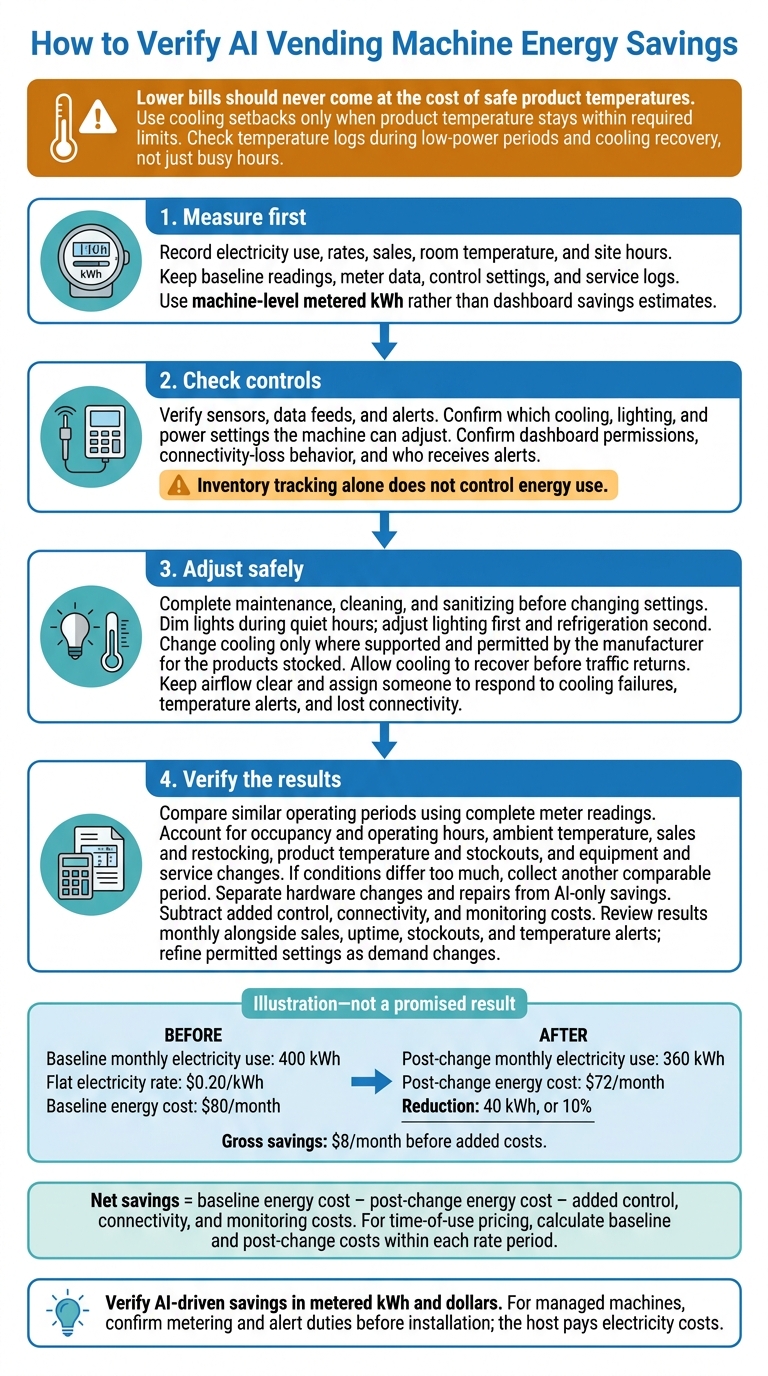
- Measure first: Record electricity use, rates, sales, room temperature, and site hours.
- Check controls: Verify sensors, data feeds, and alerts. Inventory tracking alone does not control energy use.
- Adjust safely: Complete maintenance, dim lights during quiet hours, and change cooling only where permitted.
- Verify the results: Compare similar periods, then subtract added control, connectivity, and monitoring costs.
For illustration: At $0.20/kWh, cutting monthly use from 400 to 360 kWh saves 10%, or $8, before added costs – not a promised result.
My rule: <u>lower bills should never come at the cost of safe product temperatures</u>. If you use a managed provider such as MotoSnax Vending, confirm metering and alert duties before installation; the host pays electricity costs.
How to Verify AI Vending Machine Energy Savings
Energy Efficiency in Vending Machines
sbb-itb-aa27f9f
Step 1: Connect Sensors and Check Data
With baseline energy use recorded, check that the sensors and data feed can support control decisions. Inventory tracking does not control energy use. Confirm which cooling, lighting, and power settings the machine can adjust.
Check Hardware, Connectivity, and Dashboard Access
Review the model’s documentation for compatible temperature sensors, monitoring hardware, and energy controls. ENERGY STAR labels and LED lighting indicate efficiency – not automation.[1]
Have the installer test Wi-Fi or cellular service at the machine’s final location.[1] Before turning on automation, confirm dashboard permissions, what happens when the connection drops, and who receives the alert. Check which readings each machine provides.
Verify Temperature, Door Events, and Sales Data
Confirm that readings update in real time. Compare sales, door-open events, and machine-health alerts against actual machine activity. Remote monitoring should provide live inventory and machine-health data. Monthly reports should show gaps in sales and uptime.[1]
Report missing readings through the provider’s call, text, or machine QR-code support channel.[1] Once the data feed is reliable, set the cooling and low-power controls.
Step 2: Set Cooling and Low-Power Controls
Use reliable temperature, occupancy, and sales data to set low-power controls. Finish routine maintenance, cleaning, and sanitizing before changing any settings. Then adjust lighting first and refrigeration second.[1]
Schedule Low-Power Periods and Cooling Recovery
Check facility hours, sales data, occupancy patterns, and seasonal trends to find quiet periods. Schedule lighting changes for those times. Adjust refrigeration only if the machine supports it and the manufacturer permits it for the products stocked.
Allow cooling to recover before traffic returns, and watch temperature alerts during the transition.
Compare Energy-Saving Measures
Match each control to the hardware it can adjust using the table below.
| Measure | Input or signal | Affected component | Potential energy benefit | Safety or maintenance limitation |
|---|---|---|---|---|
| Adaptive cooling | AI demand forecasts and sales patterns, where supported | Compressor and refrigeration controls | May reduce cooling demand during quiet periods | Must maintain required product temperatures; forecasts alone do not control cooling |
| LED lighting and idle dimming | Timer, occupancy sensor, or fixed schedule | Interior and display lighting | Reduces lighting electricity use and heat output | Requires supported controls and enough light for checkout |
| Predictive maintenance | Machine-health readings; AI only where fault prediction is supported | Maintenance alerts for cooling equipment and other monitored hardware | May detect energy-wasting faults earlier | Alerts do not replace physical inspection, cleaning, or repairs |
What you can adjust depends on the machine’s installed hardware and controls. Once settings are in place, keep airflow clear and respond promptly to faults to protect product temperature.
Keep Products Cold and Airflow Clear
Use cooling setbacks only when product temperature stays within required limits. Follow the manufacturer’s instructions for clearance and condenser cleaning. Check that vents remain clear after every restock.
Assign someone to respond to cooling failures, temperature alerts, and lost connectivity.
Step 3: Measure Savings and Adjust Settings
Check whether the new low-power and cooling settings reduce measured energy use.
Compare Similar Operating Periods
Compare metered kWh before and after the changes – not dashboard savings estimates. Use sales, uptime, temperature, occupancy, and restocking records to separate the effect of AI settings from other changes.[1] The table below helps account for differences in traffic, temperature, and service.
If conditions differ too much, collect data from another comparable period rather than attributing the full reduction to AI.
| Metric | Baseline period | Post-change period | Adjustment or interpretation |
|---|---|---|---|
| Electricity use | Metered kWh | Metered kWh | Use complete meter readings for both periods. |
| Occupancy and operating hours | Site attendance and hours | Same records after changes | Lower attendance or shorter hours can reduce consumption on their own. |
| Ambient temperature | Room temperature | Room temperature | Warmer surroundings increase cooling load. |
| Sales and restocking | Units sold, product mix, service visits | Same activity records | Product turnover and door openings affect cooling recovery. |
| Product temperature and stockouts | Temperature logs and stockouts | Same records after changes | Lower kWh is not a success if safety or availability suffers. |
| Equipment and service | Equipment and service record | Changes during the test | Separate savings from hardware changes and repairs from AI savings. |
Keep equipment unchanged during the test. If you replace the machine or repair its cooling system, report the combined change – not an AI-only gain. Check temperature logs during low-power periods and cooling recovery, not just busy hours.
Calculate Net Savings and Refine Settings
Net savings = baseline energy cost − post-change energy cost − added control, connectivity, and monitoring costs.
For a flat electricity rate, multiply the measured kWh reduction by the applicable $/kWh rate. For time-of-use pricing, calculate baseline and post-change costs within each rate period. A single average rate can hide the cost of shifting cooling into more expensive hours.[1]
Review results monthly alongside sales, uptime, stockouts, and temperature alerts. Adjust permitted settings as demand changes, and remove any setback if cooling recovery cannot keep up. Treat dashboard savings as estimates until meter readings confirm them.[1]
Conclusion: Keep Tracking Energy Savings
Keep baseline readings, meter data, control settings, and service logs. Verify AI-driven savings in metered kWh and dollars, while keeping product temperatures within safe limits. Before installation, confirm how these measurements will be tracked.
Confirm Equipment and Service With MotoSnax Vending
Choosing a managed provider? Ask about equipment and service before installation. MotoSnax Vending provides managed smart vending machines in New York and Connecticut. The host pays electricity costs.[1]
Ask which energy controls the machine supports, whether its dashboard shows measured kWh, whether it needs separate metering, and who reviews settings and alerts. Inventory monitoring alone does not verify energy use or temperature control.
Check monthly reports and utility bills to verify energy use, sales, and uptime. Use machine-level meter data to confirm consumption, and assign someone to check product temperatures.[1]
FAQs
How long should I measure energy use before enabling AI controls?
Measure your machine’s energy use for two to four weeks before enabling AI controls. This gives you an accurate baseline that reflects your facility’s traffic patterns, including differences between weekdays and weekends.
MotoSnax Vending uses this data to adjust cooling cycles and lighting without compromising product quality. These adjustments help the AI deliver more precise energy savings and keep the machine running more efficiently [1][2].
Can my existing vending machine support AI energy controls?
Most existing vending machines can’t be retrofitted with advanced AI energy controls. These controls need hardware and software built into newer AI-powered equipment to manage energy use and inventory.
The most efficient way to get these features is through a full-service provider like MotoSnax Vending. We offer free, fully managed AI-powered smart coolers and combo machines built to optimize energy use and performance from the start.
Which products need continuous refrigeration during low-power periods?
Perishable foods and frozen meals need continuous refrigeration, even during low-power periods, to stay safe and maintain quality [1]. MotoSnax Vending uses AI-powered smart coolers and advanced vending systems to monitor machine health and keep these temperature-sensitive items at optimal temperatures. This helps prevent spoilage while energy management features are active [1][2].