
An AI vending machine is only accessible if a person can reach it, use it, pay, get the item, and get help if something goes wrong. In the U.S., that starts with ADA basics like 15–48 inch reach ranges, 30 x 48 inches of clear floor space, and controls that work with one hand and no more than 5 pounds of force. But good access also depends on clear screens, audio support, tactile controls, payment choice, and post-install testing.
If you manage a site in New York or Connecticut, here’s the short version: tap-to-pay alone is not enough. A low card reader, readable prompts, non-visual payment feedback, and a simple refund path matter just as much. And because 18.0% of U.S. adults reported some difficulty seeing in 2024, screen design and audio cues are not small details.
Before you place or approve a machine, I’d focus on these points:
- Placement first: clear route, clear floor space, and reachable controls
- More than one payment path: tap, chip, and other options if one fails
- Usable interface: large text, high contrast, short steps, plain error messages
- Non-visual access: audio guidance, tactile buttons, and touch-based landmarks
- Support after install: refund handling, fault alerts, and retesting after moves or updates
A simple way to think about it: access is a full transaction test, not a feature list.
| Area | What to check |
|---|---|
| Physical access | 36-inch route, 30 x 48-inch clear floor space, reachable reader and controls |
| Payment | Tap works, chip fallback works, payment result is clear |
| Screen use | Text is easy to read, steps stay consistent, errors explain next action |
| Non-visual use | Audio covers the full flow, tactile controls are easy to find |
| After-sale help | Refund path is clear, support info is posted, failures are logged |
Understanding how a vending machine works can help you better troubleshoot these accessibility and payment failures.
I’d use the article as a site review guide: check the machine in its actual location, run a full purchase, test failure cases, and document what blocks use.
Designing Vending Machines for Accessibility and Inclusivity
sbb-itb-aa27f9f
Accessible Contactless Payment Starts with Machine Placement
AI Vending Machine Accessibility: Payment Methods vs. Barriers
With the legal basics in place, placement is the next hurdle. Accessible contactless payment starts with physical access. If someone can’t reach the reader, tap-to-pay doesn’t help.
Reach Range, Clear Floor Space, and Reader Placement
Any operable part – the reader, screen, and cancel button – should generally sit within the ADA reach range after the machine is leveled on-site. That last part matters because leveling legs can change the final reader height.
Reader height is only part of the picture. The approach area matters just as much. A wheelchair user needs at least 30 by 48 inches of clear floor space to pull up and line up with the reader.[3] And that space has to stay clear after installation. A trash can, curled floor mat, or product display can wipe out access fast. In tight layouts, extra maneuvering room may also be needed.[3]
A usable setup depends on the full path working together: a clear approach area, a reader within reach, and nonvisual confirmation. One without the others can still leave the machine hard to use.
Facility teams should re-measure and re-check the full approach every time a machine is moved, even if it only shifts to another spot in the same room.
Contactless Cards, Mobile Wallets, and QR-Based Payment Options
Once the reader is within reach, the payment method should make things easier, not harder. NFC-enabled cards and mobile wallets can cut down the physical effort needed to pay. That helps people with limited grip strength, arthritis, or tremors. But there’s a catch: the reader still has to be close enough to reach, and the tap point has to be close enough for the payment to register.
Mobile wallets like Apple Pay and Google Pay add a few steps on the user’s side. The device has to be compatible, charged, unlocked, and ready to authenticate. QR-based payment can also help because customers use their own device, but the QR code needs to be large, high-contrast, within reach, and easy to scan.
No single payment option works for every person. That’s why offering more than one way to pay can make a big difference.
Matching Accessibility Barriers to Payment Features
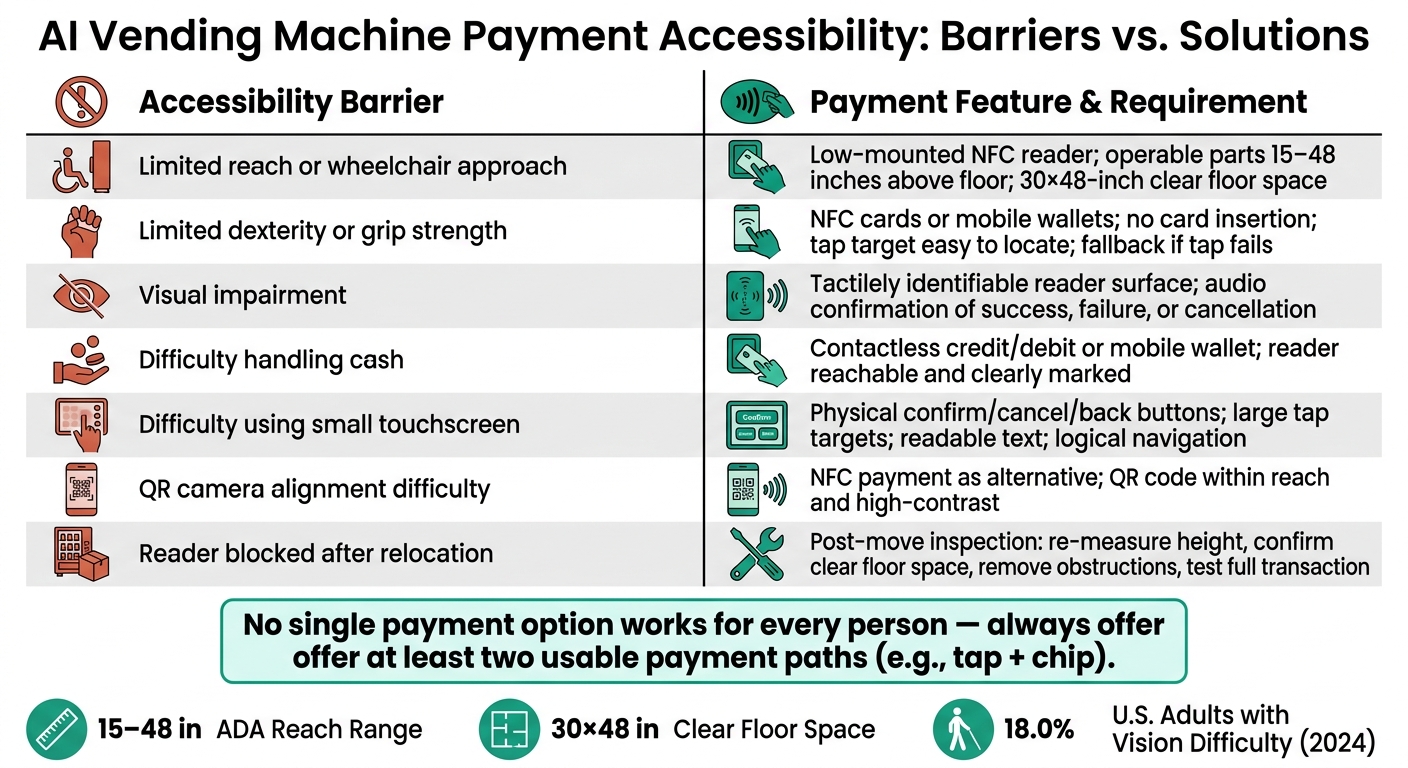
The simplest way to connect barriers with payment features is to map them side by side.
| Accessibility barrier | Relevant payment feature | Implementation requirement |
|---|---|---|
| Limited reach or wheelchair approach | Low-mounted NFC reader, controls within reach range | Operable parts generally 15–48 inches above the floor; 30-by-48-inch clear floor space; unobstructed approach.[4][3] |
| Limited dexterity or grip strength | NFC cards, mobile wallets, large controls | Tap target easy to locate; no card insertion or cash handling; another option if tap fails. |
| Visual impairment | Tactilely identifiable reader, audio confirmation | Reader surface distinguishable by touch; nonvisual feedback on success, failure, or cancellation.[5][8] |
| Difficulty handling cash | Contactless credit/debit, mobile wallets | Tap-to-pay without coins or bills; reader reachable and clearly marked. |
| Difficulty using a small touchscreen | Physical controls, accessible software | Sufficiently large targets, readable text, logical navigation steps. |
| QR camera alignment difficulty | NFC payment as alternative | NFC avoids camera dependency; QR code must be within reach and high-contrast. |
| Reader blocked after relocation | Post-move accessibility inspection | Re-measure height, confirm clear floor space, remove new obstructions, test full transaction.[3][4] |
A machine can have the right feature on paper and still be hard to use if the physical setup gets in the way.
AI Interface Features That Improve Usability During Payment
Once the reader is within reach, the screen has to carry the transaction the rest of the way. So the interface becomes the next access check.
Clear Instructions, Consistent Navigation, and Useful Error Messages
A short, fixed flow – choose, review, pay, collect – helps people form a mental map. Keep one main action on each screen. Keep controls in the same spot from start to finish. That kind of consistency makes the process easier to follow.
Text should be large, high-contrast, and plainspoken. Directions like "select a product", "tap your card", or "retrieve your item" work far better than vague prompts or screens that lean only on icons. Prices should appear in U.S. dollars, such as $2.50.
"Transaction failed" leaves people stuck. "Card declined – try another payment method or select Cancel for a refund" gives a clear next move. The same goes for dispense problems: "Payment approved, but the product did not dispense. Select Refund or call support at [number]." The interface should never leave the user guessing about what comes next.[9]
Audio Guidance, Tactile Controls, and Non-Visual Confirmation
Speech output should cover the full payment flow: product name, price, payment prompt, payment result, dispense status, and the refund path. People should be able to pause or replay speech and change the volume. A 3.5 mm headphone jack or privacy handset helps keep payment details private in public places. After each transaction, the machine should reset audio settings so the next person starts from a clean default.[5][10]
Tactile controls matter because a flat touchscreen offers no physical landmarks. People who use touch to navigate need controls that stay put across screens. Physical buttons for confirm, cancel, repeat, and back – set apart by shape or position – give users a steady option that does not rely on sight.[11]
What AI Can and Cannot Do for Payment Accessibility
AI can cut down friction, but it cannot stand in for accessible design. Product recognition, automated checkout, failed-dispense detection, and adaptive prompts can help many users. But product recognition does not help a blind user who cannot start the transaction, and automated checkout does not fix a card reader that sits out of reach. Computer vision also cannot replace audio confirmation or tactile controls. Access has to cover the whole workflow – approach, selection, payment, confirmation, dispensing, refunds, and support – with no step forcing someone to use a touchscreen as the only option.[5][6]
Treat AI features as a support layer built on top of an accessible base, not a substitute for it. And when AI spots a failure, the next thing that matters is how well support and refund handling work.
Payment Method Tradeoffs and Keeping Service Accessible Over Time
Once placement and interface are accessible, long-term reliability is what decides whether payment keeps working for people day after day.
Payment Method Comparison: Availability vs. Usability
When AI payment systems stay accessible over time, the issue isn’t just which payment methods exist. It’s which ones people can finish without friction. A payment option on paper doesn’t help much if it breaks down in practice. For example, QR payment falls apart when someone can’t see the code or line up the camera. That’s why it makes sense to offer two usable paths – like tap and chip – so one failed method doesn’t stop the sale.
| Payment Method | Accessibility Benefit | Main Limitation |
|---|---|---|
| Contactless credit or debit card | Reduces fine-motor demands; no insertion or orientation needed | Tap zone may be hard to locate without tactile markers; failed taps can go unconfirmed |
| Apple Pay or Google Pay | Uses the customer’s own smartphone accessibility features, including screen readers and biometrics | Requires a compatible, charged device and authentication; not available to all users |
| QR-code payment | Touchless; can be completed on a personal device | Difficult or impossible for blind or low-vision users; needs a smartphone, camera, and connectivity |
| Chip card fallback | Familiar fallback; no smartphone required | Requires precise insertion and reach |
AI Monitoring, Refunds, and Maintenance Support
Accessibility breaks down fast when payment hardware fails or refunds become a maze.
Real-time monitoring helps by flagging payment-reader faults, network interruptions, and failed transactions before customers run into the same problem again and again. If a product fails to dispense, the machine should catch that, log the transaction, and start a refund without forcing the customer through a hard-to-use menu or making them hunt down a manager.
The refund process should also work beyond digital channels. If help is available only through an app, QR code, or touchscreen, many people get stuck. A support phone number posted in high-contrast text at a reachable height gives people another way to get help when digital support isn’t workable.
Transaction data can also point to trouble spots. Repeated failures, abandoned payments, or slow completion times are signs that a person should step in and review what’s going wrong.
How MotoSnax Vending Supports Daily Accessibility
Managed service helps keep access features working after installation. That’s the part people often miss.
MotoSnax Vending provides free, fully managed service in New York and Connecticut, including installation, maintenance, restocking, and real-time monitoring. Managed service does not guarantee ADA compliance at a specific site. Before installation, assign clear responsibility for site access testing, refund handling, escalation, and post-installation accessibility verification.
The checklist below turns these tradeoffs into an on-site test.
Accessibility Verification Checklist and Key Takeaways
On-Site Checklist for Testing an AI Vending Machine
Use this checklist to confirm the full transaction, from approach to refund.
| Check | What to Verify | What to Record |
|---|---|---|
| Machine coverage | At least one machine of each applicable type has an accessible setup [1][7] | Machine type, ID, location, configuration, and verification date |
| Accessible route | The path to the machine is 36 inches wide and free of obstructions [12] | Measured width and any obstructions |
| Clear floor space | At least 30 by 48 inches of clear floor or ground space is available at the controls and payment area [2][11] | Dimensions and approach direction |
| Reach height | All operable elements – including readers, screens, keypads, scanners, product-selection controls, and refund openings – fall within the applicable 15-to-48-inch reach range [2][4] | Measurements per element |
| Payment methods | Test contactless cards, mobile wallets, and QR payment on multiple devices, including failure cases | Method, device, result, error message |
| Selection and dispense | Complete a full purchase from selection to retrieval and confirm success | Product, time, result |
| Screen and prompts | Verify readable text, strong contrast, consistent navigation, and clear payment, error, and refund messages | Screen state and lighting conditions |
| Audio and tactile | If provided, test the full transaction by audio and confirm tactile labels match the software | Function, label accuracy, condition |
| Refunds | Trigger a failed dispense, canceled transaction, and duplicate charge; confirm the machine explains next steps | Transaction ID, refund time, message |
| Corrective-action log | Record machine ID, location, date, tester, barrier, severity, workaround, owner, target date, resolution, and retest result | One log entry per issue |
Run the checklist again after software updates, hardware changes, relocation, lighting changes, or when new nearby barriers appear.
Key Takeaways for Property Managers and Business Owners
The checklist above points to a simple idea: accessibility depends on both design and follow-through.
Placement and site conditions drive payment accessibility.
A machine can have the right payment tech and still be hard to use if the path is blocked, the controls are out of reach, or the lighting makes the screen hard to read. That’s why on-site testing matters. It checks what people deal with in the actual space, not just what the spec sheet says.
Multiple payment methods should reduce barriers, not create new ones. Contactless cards, mobile wallets, and QR-based options should work on their own and work the same way each time. If one method fails, the machine should still give the user another usable option.
AI interface features need multimodal support. Visual instructions, tactile controls, audio guidance, and clear error recovery need to work together so the same transaction is usable for people with different abilities. Managed service can help with upkeep, but the facility still owns accessibility verification. MotoSnax Vending provides fully managed service in New York and Connecticut for facilities that want operational follow-through built in.
This checklist is a practical review tool. It does not replace advice from a qualified accessibility professional or a formal legal compliance assessment.
FAQs
What makes an AI vending machine ADA accessible?
AI vending machines can support ADA access by using contactless payments, which cut down on the need to handle coin slots or bill validators. Tap-to-pay options like Apple Pay and Google Pay make the buying process simpler and easier for more people to use.
MotoSnax Vending builds on that with fully managed, AI-powered machines that are reliable and easy to use. The result is a setup that helps people with different physical abilities get snacks and drinks on their own.
Why isn’t tap-to-pay enough?
Tap-to-pay is handy. It’s fast, familiar, and easy for many people to use.
But it doesn’t cover the full range of accessibility needs on its own. Some people need voice guidance, tactile feedback, or visual adjustments to use a machine with confidence.
That’s where MotoSnax Vending comes in. Its AI-powered features help fill those gaps, making smart coolers and vending machines more inclusive and easier to use.
How should accessibility be tested after installation?
Carry out a full physical and digital audit after installation. Check that the contactless payment interface sits at an accessible height, usually 15 to 48 inches from the floor. Then test the AI-driven interface to make sure it gives clear audio cues or high-contrast visual feedback.
Also check the area around the machine for obstructions. Proper placement plays a big part in meeting accessibility standards.